
agriconnect / ripgrep deb
Repository URL to install this package:
|
Version:
0.8.1 ▾
|
| .. |
| README.md |
| copyright |
ripgrep (rg)
ripgrep is a line-oriented search tool that recursively searches your current directory for a regex pattern while respecting your gitignore rules. ripgrep has first class support on Windows, macOS and Linux, with binary downloads available for every release. ripgrep is similar to other popular search tools like The Silver Searcher, ack and grep.


Dual-licensed under MIT or the UNLICENSE.
CHANGELOG
Please see the CHANGELOG for a release history.
Documentation quick links
- Installation
- User Guide
- Frequently Asked Questions
- Regex syntax
- Configuration files
- Shell completions
- Building
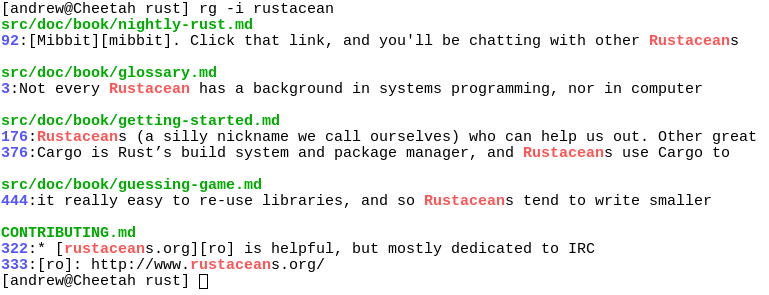
Screenshot of search results
Quick examples comparing tools
This example searches the entire Linux kernel source tree (after running
make defconfig && make -j8) for [A-Z]+_SUSPEND, where all matches must be
words. Timings were collected on a system with an Intel i7-6900K 3.2 GHz, and
ripgrep was compiled with SIMD enabled.
Please remember that a single benchmark is never enough! See my blog post on ripgrep for a very detailed comparison with more benchmarks and analysis.
| Tool | Command | Line count | Time |
|---|---|---|---|
| ripgrep (Unicode) | rg -n -w '[A-Z]+_SUSPEND' |
450 | 0.106s |
| git grep | LC_ALL=C git grep -E -n -w '[A-Z]+_SUSPEND' |
450 | 0.553s |
| The Silver Searcher | ag -w '[A-Z]+_SUSPEND' |
450 | 0.589s |
| git grep (Unicode) | LC_ALL=en_US.UTF-8 git grep -E -n -w '[A-Z]+_SUSPEND' |
450 | 2.266s |
| sift | sift --git -n -w '[A-Z]+_SUSPEND' |
450 | 3.505s |
| ack | ack -w '[A-Z]+_SUSPEND' |
1878 | 6.823s |
| The Platinum Searcher | pt -w -e '[A-Z]+_SUSPEND' |
450 | 14.208s |
Here's another benchmark that disregards gitignore files and searches with a whitelist instead. The corpus is the same as in the previous benchmark, and the flags passed to each command ensure that they are doing equivalent work:
| Tool | Command | Line count | Time |
|---|---|---|---|
| ripgrep | rg -L -u -tc -n -w '[A-Z]+_SUSPEND' |
404 | 0.079s |
| ucg | ucg --type=cc -w '[A-Z]+_SUSPEND' |
390 | 0.163s |
| GNU grep | egrep -R -n --include='*.c' --include='*.h' -w '[A-Z]+_SUSPEND' |
404 | 0.611s |
(ucg has slightly different behavior in the presence of symbolic links.)
And finally, a straight-up comparison between ripgrep and GNU grep on a single
large file (~9.3GB,
OpenSubtitles2016.raw.en.gz):
| Tool | Command | Line count | Time |
|---|---|---|---|
| ripgrep | rg -w 'Sherlock [A-Z]\w+' |
5268 | 2.108s |
| GNU grep | LC_ALL=C egrep -w 'Sherlock [A-Z]\w+' |
5268 | 7.014s |
In the above benchmark, passing the -n flag (for showing line numbers)
increases the times to 2.640s for ripgrep and 10.277s for GNU grep.
Why should I use ripgrep?
- It can replace many use cases served by both The Silver Searcher and GNU grep because it is generally faster than both. (See the FAQ for more details on whether ripgrep can truly replace grep.)
- Like The Silver Searcher, ripgrep defaults to recursive directory search
and won't search files ignored by your
.gitignorefiles. It also ignores hidden and binary files by default. ripgrep also implements full support for.gitignore, whereas there are many bugs related to that functionality in The Silver Searcher. - ripgrep can search specific types of files. For example,
rg -tpy foolimits your search to Python files andrg -Tjs fooexcludes Javascript files from your search. ripgrep can be taught about new file types with custom matching rules. - ripgrep supports many features found in
grep, such as showing the context of search results, searching multiple patterns, highlighting matches with color and full Unicode support. Unlike GNU grep, ripgrep stays fast while supporting Unicode (which is always on). - ripgrep supports searching files in text encodings other than UTF-8, such
as UTF-16, latin-1, GBK, EUC-JP, Shift_JIS and more. (Some support for
automatically detecting UTF-16 is provided. Other text encodings must be
specifically specified with the
-E/--encodingflag.) - ripgrep supports searching files compressed in a common format (gzip, xz,
lzma or bzip2 current) with the
-z/--search-zipflag.
In other words, use ripgrep if you like speed, filtering by default, fewer bugs, and Unicode support.
Why shouldn't I use ripgrep?
I'd like to try to convince you why you shouldn't use ripgrep. This should give you a glimpse at some important downsides or missing features of ripgrep.
- ripgrep uses a regex engine based on finite automata, so if you want fancy
regex features such as backreferences or lookaround, ripgrep won't provide
them to you. ripgrep does support lots of things though, including, but not
limited to: lazy quantification (e.g.,
a+?), repetitions (e.g.,a{2,5}), begin/end assertions (e.g.,^\w+$), word boundaries (e.g.,\bfoo\b), and support for Unicode categories (e.g.,\p{Sc}to match currency symbols or\p{Lu}to match any uppercase letter). (Fancier regexes will never be supported.) - ripgrep doesn't have multiline search. (Will happen as an opt-in feature.)
In other words, if you like fancy regexes or multiline search, then ripgrep may not quite meet your needs (yet).
Is it really faster than everything else?
Generally, yes. A large number of benchmarks with detailed analysis for each is available on my blog.
Summarizing, ripgrep is fast because:
- It is built on top of Rust's regex engine. Rust's regex engine uses finite automata, SIMD and aggressive literal optimizations to make searching very fast.
- Rust's regex library maintains performance with full Unicode support by building UTF-8 decoding directly into its deterministic finite automaton engine.
- It supports searching with either memory maps or by searching incrementally with an intermediate buffer. The former is better for single files and the latter is better for large directories. ripgrep chooses the best searching strategy for you automatically.
- Applies your ignore patterns in
.gitignorefiles using aRegexSet. That means a single file path can be matched against multiple glob patterns simultaneously. - It uses a lock-free parallel recursive directory iterator, courtesy of
crossbeamandignore.
Feature comparison
Andy Lester, author of ack, has published an excellent table comparing the features of ack, ag, git-grep, GNU grep and ripgrep: https://beyondgrep.com/feature-comparison/
Installation
The binary name for ripgrep is rg.
Archives of precompiled binaries for ripgrep are available for Windows, macOS and Linux. Users of platforms not explicitly mentioned below are advised to download one of these archives.
Linux binaries are static executables. Windows binaries are available either as built with MinGW (GNU) or with Microsoft Visual C++ (MSVC). When possible, prefer MSVC over GNU, but you'll need to have the Microsoft VC++ 2015 redistributable installed.
If you're a macOS Homebrew or a Linuxbrew user, then you can install ripgrep either from homebrew-core, (compiled with rust stable, no SIMD):
$ brew install ripgrep
or you can install a binary compiled with rust nightly (including SIMD and all optimizations) by utilizing a custom tap:
$ brew tap burntsushi/ripgrep https://github.com/BurntSushi/ripgrep.git
$ brew install ripgrep-bin
If you're a Windows Chocolatey user, then you can install ripgrep from the official repo:
$ choco install ripgrep
If you're a Windows Scoop user, then you can install ripgrep from the official bucket:
$ scoop install ripgrep
If you're an Arch Linux user, then you can install ripgrep from the official repos:
$ pacman -S ripgrep
If you're a Gentoo user, you can install ripgrep from the official repo:
$ emerge sys-apps/ripgrep
If you're a Fedora 27+ user, you can install ripgrep from official repositories.
$ sudo dnf install ripgrep
If you're a Fedora 24+ user, you can install ripgrep from copr:
$ sudo dnf copr enable carlwgeorge/ripgrep
$ sudo dnf install ripgrep
If you're a RHEL/CentOS 7 user, you can install ripgrep from copr:
$ sudo yum-config-manager --add-repo=https://copr.fedorainfracloud.org/coprs/carlwgeorge/ripgrep/repo/epel-7/carlwgeorge-ripgrep-epel-7.repo
$ sudo yum install ripgrep
If you're a Nix user, you can install ripgrep from nixpkgs:
$ nix-env --install ripgrep
$ # (Or using the attribute name, which is also ripgrep.)
If you're a Debian user (or a user of a Debian derivative like Ubuntu),
then ripgrep can be installed using a binary .deb file provided in each
ripgrep release. Note that
ripgrep is not in the official Debian or Ubuntu repositories.
$ curl -LO https://github.com/BurntSushi/ripgrep/releases/download/0.8.1/ripgrep_0.8.1_amd64.deb
$ sudo dpkg -i ripgrep_0.8.1_amd64.deb
If you're an Ubuntu user, ripgrep can be installed from the snap store.
- Note that if you are using
16.04 LTSor later, snap is already installed. - For older versions you can install snap using this guide.
- If you get permission errors when running ripgrep after installation, try
uninstalling and then re-installing with the
--classicflag.
For the latest stable release:
$ sudo snap install rg
For the most recent release candidate:
$ sudo snap install --candidate rg
If you're a Rust programmer, ripgrep can be installed with cargo.
- Note that the minimum supported version of Rust for ripgrep is 1.20, although ripgrep may work with older versions.
- Note that the binary may be bigger than expected because it contains debug
symbols. This is intentional. To remove debug symbols and therefore reduce
the file size, run
stripon the binary.
$ cargo install ripgrep
If you're using Rust nightly, then use
$ cargo install ripgrep --features unstable
to get SIMD optimizations.
ripgrep isn't currently in any other package repositories. I'd like to change that.
Building
ripgrep is written in Rust, so you'll need to grab a Rust installation in order to compile it. ripgrep compiles with Rust 1.20 (stable) or newer. Building is easy:
$ git clone https://github.com/BurntSushi/ripgrep
$ cd ripgrep
$ cargo build --release
$ ./target/release/rg --version
0.1.3
If you have a Rust nightly compiler and a recent Intel CPU, then you can enable optional SIMD acceleration like so:
RUSTFLAGS="-C target-cpu=native" cargo build --release --features 'simd-accel avx-accel'
If your machine doesn't support AVX instructions, then simply remove
avx-accel from the features list. Similarly for SIMD (which corresponds
roughly to SSE instructions).
Running tests
ripgrep is relatively well-tested, including both unit tests and integration tests. To run the full test suite, use:
$ cargo test --all
from the repository root.