
Why Gemfury?
Push, build, and install
RubyGems
npm packages
Python packages
Maven artifacts
PHP packages
Go Modules
Debian packages
RPM packages
NuGet packages
Repository URL to install this package:
|
Version:
0.70.0.dev5730 ▾
|
from typing import Optional, Union
from flet.controls.adaptive_control import AdaptiveControl
from flet.controls.alignment import Alignment
from flet.controls.animation import AnimationValue
from flet.controls.base_control import control
from flet.controls.blur import BlurValue
from flet.controls.border import Border
from flet.controls.border_radius import BorderRadiusValue
from flet.controls.box import (
BoxDecoration,
BoxShadowValue,
BoxShape,
ColorFilter,
DecorationImage,
)
from flet.controls.control import Control
from flet.controls.control_event import ControlEventHandler, EventHandler
from flet.controls.events import TapEvent
from flet.controls.gradients import Gradient
from flet.controls.layout_control import LayoutControl
from flet.controls.padding import PaddingValue
from flet.controls.theme import Theme
from flet.controls.types import (
BlendMode,
ClipBehavior,
ColorValue,
ThemeMode,
Url,
)
__all__ = ["Container"]
@control("Container")
class Container(LayoutControl, AdaptiveControl):
"""
Allows to decorate a control with background color and border and
position it with padding, margin and alignment.
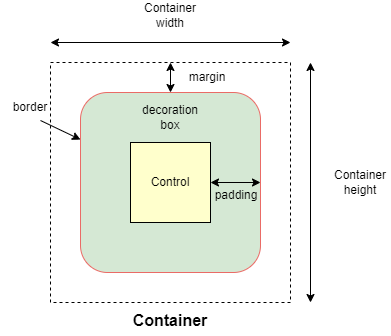{width="80%"}
/// caption
///
"""
content: Optional[Control] = None
"""
The content of this container.
"""
padding: Optional[PaddingValue] = None
"""
Empty space to inscribe inside a container decoration (background, border). The
child control is placed inside this padding.
"""
alignment: Optional[Alignment] = None
"""
Defines the alignment of the [`content`][flet.Container.content] inside the
container.
"""
bgcolor: Optional[ColorValue] = None
"""
Defines the background color of the
container.
"""
gradient: Optional[Gradient] = None
"""
Defines the gradient background of the container.
"""
blend_mode: Optional[BlendMode] = None
"""
The blend mode applied to the `color` or `gradient` background of the container.
Defaults to `BlendMode.MODULATE`.
"""
border: Optional[Border] = None
"""
A border to draw above the background color.
"""
border_radius: Optional[BorderRadiusValue] = None
"""
The border radius of this container.
"""
shape: BoxShape = BoxShape.RECTANGLE
"""
Sets the shape of this container.
"""
clip_behavior: Optional[ClipBehavior] = None
"""
Defines how the [`content`][flet.Container.content] of the container is clipped.
Defaults to `ClipBehavior.ANTI_ALIAS` if
[`border_radius`][flet.Container.border_radius] is not `None`;
otherwise `ClipBehavior.NONE`.
"""
ink: bool = False
"""
`True` to produce ink ripples effect when user clicks the container.
"""
image: Optional[DecorationImage] = None
"""
An image to paint above the `bgcolor` or `gradient`. If `shape=BoxShape.CIRCLE`
then this image is clipped to the circle's boundary; if `border_radius` is not
`None` then the image is clipped to the given radii.
"""
ink_color: Optional[ColorValue] = None
"""
The splash color of the ink response.
"""
animate: Optional[AnimationValue] = None
"""
Enables container "implicit" animation that gradually changes its values over a
period of time.
"""
blur: Optional[BlurValue] = None
"""
Applies Gaussian blur effect under the container.
Example:
```python
ft.Stack(
controls=[
ft.Container(
content=ft.Text("Hello"),
image_src="https://picsum.photos/100/100",
width=100,
height=100,
),
ft.Container(
width=50,
height=50,
blur=10,
bgcolor="#44CCCC00",
),
ft.Container(
width=50,
height=50,
left=10,
top=60,
blur=(0, 10),
),
ft.Container(
top=10,
left=60,
blur=ft.Blur(10, 0, ft.BlurTileMode.MIRROR),
width=50,
height=50,
bgcolor="#44CCCCCC",
border=ft.border.all(2, ft.Colors.BLACK),
),
]
)
```
"""
shadow: Optional[BoxShadowValue] = None
"""
The shadow(s) below this container.
"""
url: Optional[Union[str, Url]] = None
"""
The URL to open when this container is clicked.
Additionally, if [`on_click`][flet.Container.on_click] event callback is provided,
it is fired after that.
"""
theme: Optional[Theme] = None
"""
Allows setting a nested theme for all controls inside the container and down its
tree.
Example:
```python
import flet as ft
def main(page: ft.Page):
# Yellow page theme with SYSTEM (default) mode
page.theme = ft.Theme(
color_scheme_seed=ft.Colors.YELLOW,
)
page.add(
# Page theme
ft.Container(
content=ft.Button("Page theme button"),
bgcolor=ft.Colors.SURFACE_CONTAINER_HIGHEST,
padding=20,
width=300,
),
# Inherited theme with primary color overridden
ft.Container(
theme=ft.Theme(color_scheme=ft.ColorScheme(primary=ft.Colors.PINK)),
content=ft.Button("Inherited theme button"),
bgcolor=ft.Colors.SURFACE_CONTAINER_HIGHEST,
padding=20,
width=300,
),
# Unique always DARK theme
ft.Container(
theme=ft.Theme(color_scheme_seed=ft.Colors.INDIGO),
theme_mode=ft.ThemeMode.DARK,
content=ft.Button("Unique theme button"),
bgcolor=ft.Colors.SURFACE_CONTAINER_HIGHEST,
padding=20,
width=300,
),
)
ft.run(main)
```
"""
dark_theme: Optional[Theme] = None
"""
Allows setting a nested theme to be used when in dark theme mode for all controls
inside the container and down its tree.
"""
theme_mode: Optional[ThemeMode] = None
"""
"Resets" parent theme and creates a new, unique scheme for all
controls inside the container. Otherwise the styles defined in container's
[`theme`][flet.Container.theme] property override corresponding styles from
the parent, inherited theme.
Defaults to `ThemeMode.SYSTEM`.
"""
color_filter: Optional[ColorFilter] = None
"""
Applies a color filter to this container.
"""
ignore_interactions: bool = False
"""
Whether to ignore all interactions with this container and its descendants.
"""
foreground_decoration: Optional[BoxDecoration] = None
"""
The foreground decoration of this container.
"""
on_click: Optional[ControlEventHandler["Container"]] = None
"""
Called when a user clicks the container. Will not be fired on long press.
"""
on_tap_down: Optional[EventHandler[TapEvent["Container"]]] = None
"""
Called when a user clicks the container with or without a long press.
Info:
If [`ink=True`][flet.Container.ink], the event handler argument will be plain
[`ControlEvent`][flet.ControlEvent] with empty `data` instead of
[`TapEvent`][flet.TapEvent].
Example:
```python
import flet as ft
def main(page: ft.Page):
page.vertical_alignment = ft.MainAxisAlignment.CENTER
page.horizontal_alignment = ft.CrossAxisAlignment.CENTER
def on_long_press(e):
print("on long press")
page.add(ft.Text("on_long_press triggered"))
def on_click(e):
print("on click")
page.add(ft.Text("on_click triggered"))
def on_tap_down(e: ft.ContainerTapEvent):
print("on tap down", e.local_x, e.local_y)
page.add(ft.Text("on_tap_down triggered"))
c = ft.Container(
bgcolor=ft.Colors.RED,
content=ft.Text("Test Long Press"),
height=100,
width=100,
on_click=on_click,
on_long_press=on_long_press,
on_tap_down=on_tap_down,
)
page.add(c)
ft.run(main)
```
"""
on_long_press: Optional[ControlEventHandler["Container"]] = None
"""
Called when this container is long-pressed.
"""
on_hover: Optional[ControlEventHandler["Container"]] = None
"""
Called when a mouse pointer enters or exists the container area.
The `data` property of the event handler argument is `True` when the cursor
enters and `False` when it exits.
Example:
A container changing its background color on mouse hover:
```python
import flet as ft
def main(page: ft.Page):
def on_hover(e):
e.control.bgcolor = "blue" if e.data == True else "red"
e.control.update()
page.add(
ft.Container(
width=100,
height=100,
bgcolor="red",
ink=False,
on_hover=on_hover,
)
)
ft.run(main)
```
"""
def init(self):
super().init()
self._internals["skip_properties"] = ["width", "height", "margin"]