
Why Gemfury?
Push, build, and install
RubyGems
npm packages
Python packages
Maven artifacts
PHP packages
Go Modules
Debian packages
RPM packages
NuGet packages
 rauldipeas

rauldipeas
https://repo.fury.io/rauldipeas/
| Name | Kind | Latest version | |
|---|---|---|---|
| aim | deb | 1.8.8 | |
| 🎯 A command line download/upload tool with resume. | |||
| aitum-stream-suite | deb | 1.1.2 | |
| aitum-stream-suite built using CMake | |||
| amdgpu-top | deb | 0.11.5-1 | |
| Tool to displays AMDGPU usage. The tool displays information gathered from performance counters (GRBM, GRBM2), sensors, fdinfo, gpu_metrics and AMDGPU driver. # AMDGPU\_TOP `amdgpu_top` is tool that display AMD GPU utilization, like [umr](https://gitlab.freedesktop.org/tomstdenis/umr/) or [clbr/radeontop](https://github.com/clbr/radeontop) or [intel_gpu_top](https://gitlab.freedesktop.org/drm/igt-gpu-tools/-/blob/master/man/intel_gpu_top.rst). . The tool displays information gathered from performance counters (GRBM, GRBM2), sensors, fdinfo, and AMDGPU driver. . | Simple TUI<br>(like nvidia-smi, rocm-smi) | TUI (light) | TUI (dark) | GUI | | :-: | :-: | :-: | :--: | |  |  |  | 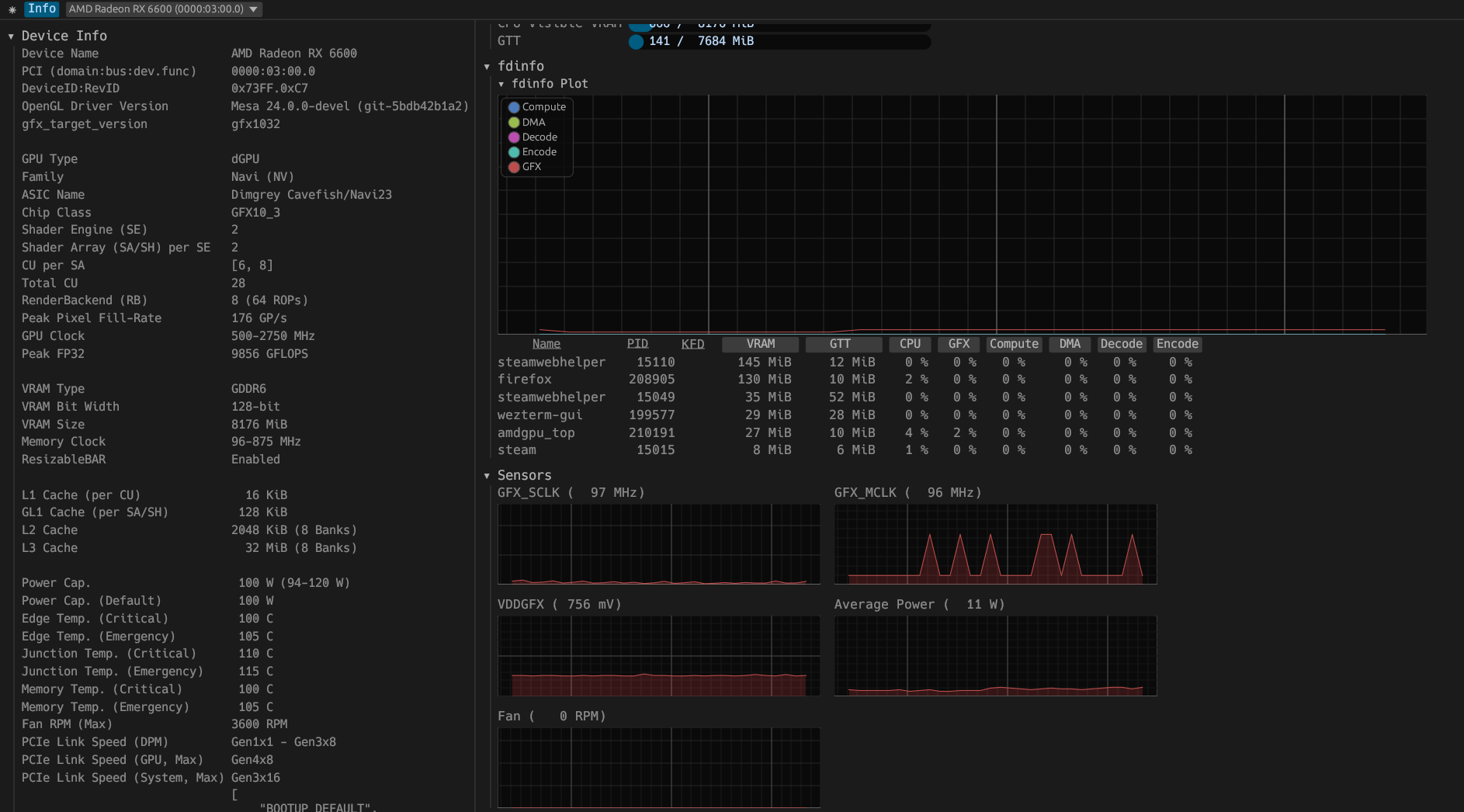 | . ## Quick links * [Usage](#usage) * [Options](#options) * [Commands for TUI](#commands-for-tui) * [Example of using JSON mode](#example-of-using-json-mode) * [fdinfo description](#fdinfo-description) * [Installation](#installation) * [Packages](#packages) * [Build from source](#build-from-source) * [Distribution specific instructions](#distribution-specific-instructions) * [Binary Size](#binary-size) * [References](#references) * [Translations](#translations) * [Alternatives](#alternatives) . ## Dependent dynamic libraries * libdrm * libdrm_amdgpu . ## Usage ``` cargo run -- [options ..] # or amdgpu_top [options ..] ``` . ``` # Run TUI mode amdgpu_top . # Run GUI mode amdgpu_top --gui . # Run SMI mode amdgpu_top --smi . # Dump AMDGPU info amdgpu_top -d . # Dump AMDGPU info and gpu_metrics amdgpu_top -d -gm . # Dump AMDGPU info and pp_table amdgpu_top -d --pp-table . # Dump AMDGPU info in JSON format amdgpu_top -d --json . # Dump DRM info amdgpu_top --drm-info . # Decode gpu_metrics file amdgpu_top --decode-gm <path> . # Decode gpu_metrics file and output in JSON format amdgpu_top --json --decode-gm <path> ``` . ### Options ``` FLAGS: -d, --dump Dump AMDGPU info. (Specifications, VRAM, PCI, ResizableBAR, VBIOS, Video caps) This option can be combined with the "-J" option. --list Display a list of AMDGPU devices. -J, --json Output JSON formatted data. This option can be combined with the "-d" option. --gui Launch GUI mode. --smi Launch Simple TUI mode. (like nvidia-smi, rocm-smi) -p, --process Dump All GPU processes and memory usage per process. --apu, --select-apu Select APU instance. --single, --single-gpu Display only the selected APU/GPU --no-pc The application does not read the performance counter (GRBM, GRBM2) if this flag is set. Reading the performance counter may deactivate the power saving feature of APU/GPU. -gm, --gpu_metrics, --gpu-metrics Dump gpu_metrics for all AMD GPUs. https://www.kernel.org/doc/html/latest/gpu/amdgpu/thermal.html#gpu-metrics --pp_table, --pp-table Dump pp_table from sysfs and VBIOS for all AMD GPUs. (only support Navi1x and Navi2x, Navi3x) --drm_info, --drm-info Dump DRM info. Inspired by https://gitlab.freedesktop.org/emersion/drm_info --xdna Dump XDNA NPU info. --dark, --dark-mode Set to the dark mode. (TUI/GUI) --light, --light-mode Set to the light mode. (TUI/GUI) --gl, --opengl Use OpenGL API to the GUI backend. --vk, --vulkan Use Vulkan API to the GUI backend, and use APU/iGPU for GUI rendering if it is available. -V, --version Print version information. -h, --help Print help information. . OPTIONS: -i <usize> Select GPU instance. --pci <String> Specifying PCI path. (domain:bus:dev.func) -s <u64>, -s <u64>ms Refresh period (interval) in milliseconds for JSON mode. (default: 1000ms) -n <u32> Specifies the maximum number of iteration for JSON mode. If 0 is specified, it will be an infinite loop. (default: 0) -u <u64>, --update-process-index <u64> Update interval in seconds of the process index for fdinfo. (default: 5s) --json_fifo, --json-fifo <String> Output JSON formatted data to FIFO (named pipe) for other application and scripts. --decode-gm <Path>, --decode-gpu-metrics <Path> Decode the specified gpu_metrics file. ``` . ### Commands for TUI | key | | | :-- | :---------------------------------: | | g | toggle GRBM | | r | toggle GRBM2 | | v | toggle VRAM/GTT Usage | | f | toggle fdinfo | | n | toggle Sensors | | m | toggle GPU Metrics | | h | change update interval (high = 100ms, low = 1000ms) | | q | Quit | | P | sort fdinfo by pid | | M | sort fdinfo by VRAM usage | | G | sort fdinfo by GFX usage | | M | sort fdinfo by MediaEngine usage | | R | reverse sort | . ### Example of using JSON mode ``` $ amdgpu_top --json | jq -c -r '(.devices[] | (.Info | .DeviceName + " (" + .PCI + "): ") + ([.gpu_activity | to_entries[] | .key + ": " + (.value.value|tostring) + .value.unit] | join(", ")))' ``` . #### Output ``` AMD Radeon RX 6600 (0000:03:00.0): GFX: 13%, MediaEngine: 0%, Memory: 4% AMD Radeon Graphics (0000:08:00.0): GFX: 0%, MediaEngine: 0%, Memory: null% AMD Radeon RX 6600 (0000:03:00.0): GFX: 15%, MediaEngine: 0%, Memory: 5% AMD Radeon Graphics (0000:08:00.0): GFX: 0%, MediaEngine: 0%, Memory: null% AMD Radeon RX 6600 (0000:03:00.0): GFX: 3%, MediaEngine: 0%, Memory: 2% AMD Radeon Graphics (0000:08:00.0): GFX: 0%, MediaEngine: 0%, Memory: null% ... ``` . ### fdinfo description fdinfo for the AMDGPU driver shows hardware IP usage per process. . ### VRAM GPU Memory. . ### GTT Graphics Translation Tables. . ### KFD The process of using the AMDKFD driver. . #### GFX GFX engine. . #### Compute/COMP Compute engine. The AMDKFD driver does not track queues and does not show them in fdinfo. . #### DMA DMA/SDMA (System DMA) engine. . #### Decode/DEC Media decoder. This is not show on VCN4 or later. . #### Encode/ENC Media encoder. This is not show on VCN4 or later. . #### VCN, Media Media engine. From VCN4, the encoding queue and decoding queue have been unified. The AMDGPU driver handles both decoding and encoding as contexts for the encoding engine. . This is the average of the video decoder/encoder and the JPEG decoder usage. . #### JPEG JPEG decoder. . #### VPE Video Processor Engine. ref: <https://gitlab.freedesktop.org/mesa/mesa/-/blob/main/src/amd/vpelib/README.md?ref_type=heads> . #### VCN_Unified, VCNU The video decoder/encoder usage for VCN4. . ## Installation ### Packages * [Releases](https://github.com/Umio-Yasuno/amdgpu_top/releases/latest) * .deb (generated by [cargo-deb](https://github.com/kornelski/cargo-deb)) * .rpm (generated by [cargo-generate-rpm](https://github.com/cat-in-136/cargo-generate-rpm)) * .AppImage (generated by [xbuild](https://github.com/rust-mobile/xbuild)) * [Arch Linux](https://archlinux.org/packages/extra/x86_64/amdgpu_top/) * To install run: `sudo pacman -S amdgpu_top` * Alternatively, install from the [AUR](https://aur.archlinux.org/packages/amdgpu_top-git) * [OpenMandriva](https://github.com/OpenMandrivaAssociation/amdgpu_top) * To install run: `sudo dnf install amdgpu_top` * [Nix](https://github.com/NixOS/nixpkgs/blob/master/pkgs/by-name/am/amdgpu_top/package.nix) * [Solus](https://github.com/getsolus/packages/tree/main/packages/a/amdgpu_top) * To install run: `sudo eopkg it amdgpu_top` . ### Build from source ``` cargo install amdgpu_top . # or . git clone https://github.com/Umio-Yasuno/amdgpu_top cd amdgpu_top cargo install --locked --path . ``` . #### without GUI ``` cargo install --locked --path . --no-default-features --features="tui" ``` . #### Distribution specific instructions ##### Debian/Ubuntu ``` sudo apt install libdrm-dev ``` . ##### Fedora ``` sudo dnf install libdrm-devel ``` . ## Binary Size . | Features | Size (stripped) | | :------------- | :-------------: | | json | ~1.1M | | tui | ~1.5M | | json, tui | ~1.7M | | json, tui, gui | ~18M | . ## References * [Tom St Denis / umr · GitLab](https://gitlab.freedesktop.org/tomstdenis/umr/) * Mesa3D * [src/gallium/drivers/radeonsi/si_gpu_load.c · main · Mesa / mesa · GitLab](https://gitlab.freedesktop.org/mesa/mesa/-/blob/main/src/gallium/drivers/radeonsi/si_gpu_load.c) * AMD Documentation * [R6xx_R7xx_3D.pdf](https://developer.amd.com/wordpress/media/2013/10/R6xx_R7xx_3D.pdf) * [CIK_3D_registers_v2.pdf](http://developer.amd.com/wordpress/media/2013/10/CIK_3D_registers_v2.pdf) * [MI200 performance counters and metrics — ROCm Documentation](https://rocm.docs.amd.com/en/docs-6.0.0/conceptual/gpu-arch/mi200-performance-counters.html) * <https://github.com/AMDResearch/omniperf/tree/v1.0.4/src/perfmon_pub> * <https://github.com/freedesktop/mesa-r600_demo> * [radeonhd:r6xxErrata](https://www.x.org/wiki/radeonhd:r6xxErrata/) * Linux Kernel AMDGPU Driver * libdrm_amdgpu API * `/drivers/gpu/drm/amd/amdgpu/amdgpu_kms.c` * `amdgpu_allowed_register_entry` * `/drivers/gpu/drm/amd/amdgpu/{cik,nv,vi,si,soc15,soc21}.c` . ## Translations `amdgpu_top` is using [cargo-i18n](https://github.com/kellpossible/cargo-i18n/) with [Project Fluent](https://projectfluent.org/) for translation. Please refer to [pop-os/popsicle](https://github.com/pop-os/popsicle#translators) for additional supported languages. . ### Supported Languages * [en](./crates/amdgpu_top_gui/i18n/en/amdgpu_top_gui.ftl) * [ja (partial)](./crates/amdgpu_top_gui/i18n/ja/amdgpu_top_gui.ftl) * [ka](./crates/amdgpu_top_gui/i18n/ka/amdgpu_top_gui.ftl) . ## Alternatives If `amdgpu_top` is not enough for you or you don't like it, try the following applications. . * `AMD_DEBUG=info <opengl application>` or `RADV_DEBUG=info <vulkan application>` * Print AMDGPU-related information * <https://docs.mesa3d.org/envvars.html#envvar-AMD_DEBUG> * <https://docs.mesa3d.org/envvars.html#envvar-RADV_DEBUG> * [clbr/radeontop](https://github.com/clbr/radeontop) * View your GPU utilization, both for the total activity percent and individual blocks. * [Syllo/nvtop](https://github.com/Syllo/nvtop) * GPUs process monitoring for AMD, Intel and NVIDIA * [Tom St Denis / umr · GitLab](https://gitlab.freedesktop.org/tomstdenis/umr/) * User Mode Register Debugger for AMDGPU Hardware * [GPUOpen-Tools/radeon_gpu_profiler](https://github.com/GPUOpen-Tools/radeon_gpu_profiler) * for developer * Radeon GPU Profiler (RGP) is a tool from AMD that allows for deep inspection of GPU workloads. * [ROCm/amdsmi](https://github.com/ROCm/amdsmi) * [Getting to Know Your GPU: A Deep Dive into AMD SMI — ROCm Blogs](https://rocm.blogs.amd.com/software-tools-optimization/amd-smi-overview/README.html) | |||
| astra | deb | 0.6.1~beta | |
| Audiophile music player with advanced visualization | |||
| atuin-desktop | deb | 0.2.20 | |
| Atuin Desktop (none) | |||
| bashrun | deb | 0.0.2 | |
| Run bash scripts directly from the web browser | |||
| bibata-cursor-theme | deb | 2.0.6-1 | |
| Bibata is open source, compact, and material designed cursor set This cursor set is the masterpiece of cursors available on the internet, Hand designed by Abdulkaiz Khatri. . This project masterelop for improve cursor experience. . Bibata is one of the most popular cursors set in the Linux community so far and is now available for freely with multiple colors and size options for Windows as well. The aim of this project is to provide the personalized cursors to users. . This package contains the following cursor themes: . * Bibata Original Amber: Yellowish and sharp edge bibata cursors. * Bibata Modern Amber: Yellowish and rounded edge bibata cursors. * Bibata Original Classic: Black and sharp edge bibata cursors. * Bibata Modern Classic: Black and rounded edge bibata cursors. * Bibata Original Ice: White and sharp edge bibata cursors. * Bibata Modern Ice: White and rounded edge bibata cursors. | |||
| BYOD | deb | 1.3.0 | |
| Build-your-own guitar distortion effect. BYOD includes VST3, LV2, CLAP, and Standalone formats. | |||
| cable | deb | 0.10.12 | |
| PyQt6 application to dynamically modify Pipewire and Wireplumber settings with connections manager. | |||
| ChowKick | deb | 1.2.0 | |
| Virtual kick drum synthesizer based on creative physical modelling. ChowKick includes VST3, CLAP, LV2, and Standalone formats. | |||
| ChowMatrix | deb | 1.3.0 | |
| Virtual audio effect composed of an growable tree of modular delay lines. ChowMatrix includes VST3, LV2, and Standalone formats. | |||
| ChowMultiTool | deb | 1.1.0 | |
| Multi-Tool audio plugin. ChowMultiTool includes VST3, LV2, CLAP, and Standalone formats. | |||
| ChowTape | deb | 2.11.4 | |
| Virtual audio effect using physical modelling to emulate the sound of analog reel-to-reel tape machines. ChowTapeModel includes VST3, CLAP, LV2, and Standalone formats. | |||
| clack-amp-squeezer-overdrive | deb | 1.1.2.1 | |
| Amp Squeezer Overdrive effect plugin (VST3, LV2) | |||
| clamui | deb | 0.3.0 | |
| Modern graphical interface for ClamAV antivirus scanner ClamUI is a modern Linux desktop application that provides a graphical user interface for the ClamAV antivirus command-line tool. . Features: - Easy-to-use GTK4/libadwaita interface - Scan files and directories for malware - View and manage scan results - Desktop integration with notifications . This package requires ClamAV to be installed for scanning functionality. | |||
| container-desktop | deb | 6.0.0 | |
| Container Desktop — native Rust (Tauri) shell (none) | |||
| convertwithmoss | deb | 18.1.1 | |
| A tool for converting multi-sample from one format to another. | |||
| cuda-keyring | deb | 1.1-1 | |
| GPG keyring for the CUDA repository Enrolls public key: 8793F200 (2025) and enables repo: debian13/x86_64 | |||
| cudatext | deb | 1.234.6.0-1 | |
| Text/code editor Text/code editor with lite UI. Syntax highlighting for 300+ languages. Config system in JSON files. Multi-carets and multi-selections. Search and replace with RegEx. Extendable by Python plugins and themes. | |||
| deb-multimedia-keyring | deb | 2024.9.1 | |
| GnuPG archive key of the deb-multimedia repository The deb-multimedia repository digitally signs its Release files. This package contains the repository key used for that. | |||